Taiqi Lang 学习笔记 基础篇

Taiqi简介

Taichi是一种专为高性能并行计算而设计的特定领域语言,内嵌于Python中
在编写计算密集型任务时,用户只需遵循一组额外的规则,并使用@ti.func@ti.kernel这两个装饰器,就能充分利用Taichi的高性能计算功能。
这些装饰器指示 Taichi 接管计算任务,并使用其即时(JIT)编译器将装饰函数编译为机器代码。因此,对这些函数的调用可在多核CPU或GPU上执行,与本地Python代码相比,可实现 50~100 倍的加速。

官方文档

语言特性

  • 高性能并行计算
  • 自动微分
  • 灵活数据布局
  • 空间稀疏数据结构

安装

Taichi 是一个 PyPI 包

1
pip install taichi

初始化

1
2
import taichi as ti
ti.init(arch=ti.gpu)

参数arch指定将执行编译代码的后端。此后端可以是ti.cputi.gpu 。如果指定了该ti.gpu选项,Taichi 将尝试按以下顺序使用 GPU 后端:ti.cudati.vulkanti.opengl/ti.Metal。如果没有可用的 GPU 架构,CPU 将用作后端。也可以直接指定后端,若不可以则报错

Taichi 内核 与 Taichi 函数

Taichi 和 Python 的语法相似,但它们并不完全相同。为了区分 Taichi 代码和原生 Python 代码,我们使用了两个装饰器,@ti.kernel以及@ti.func

只有被@ti.kernel以及@ti.func修饰的才属 Taichi 的作用域,其他均为 Python 作用域

  • Taichi 内核@ti.kernel是 Taichi 运行时接管任务的入口点,它们必须由 Python 代码直接调用,不允许从另一个内核内部或从 Taichi 函数内部调用内核
  • Taichi 函数@ti.func是内核的构建块,只能由另一个 Taichi 函数或内核调用

从原生 Python 代码(Python 作用域)中调用 Taichi 函数会导致 Taichi 引发语法错误

1
2
3
4
5
6
7
8
9
10
11
12
13
14
15
16
import taichi as ti
ti.init(arch=ti.gpu)

@ti.func
def inv_square(x): # A Taichi function
return 1.0 / (x * x)

@ti.kernel
def partial_sum(n: int) -> float: # A Taichi kernel
total = 0.0
for i in range(1, n + 1):
total += inv_square(n)
return total

print(partial_sum(1000))
print(inv_square(1.0)) # Syntax error

可以在单个 Taichi 程序中定义多个内核。这些内核彼此独立,并按照首次调用的顺序进行编译和执行。编译后的内核会被缓存,以减少后续调用的启动开销

参数

无论是Taiqi内核还是Taiqi函数,传参的策略都是Pass by value

一个内核可以接受多个参数。但是不能将任意 Python 对象传递给内核。这是因为 Python 对象可以是动态的,并且可能包含 Taichi 编译器无法识别的数据

内核可以接受各种参数类型,包括标量、ti.types.matrix()ti.types.vector()ti.types.struct()ti.types.ndarray()ti.template().这些参数类型可以轻松地将数据从 Python 作用域传递到 Taichi 作用域。可以在ti.types模块中找到支持的类型

Taiqi内核和Taiqi函数在编译的时候会捕获Python作用域中的全局变量,并将其绑定作为常量传递至Taiqi作用域,而不会感知其值的变化

Taiqi 内核限制

  • 参数需要类型提示
1
2
3
4
5
@ti.kernel
def my_kernel(x: int, y: float):
print(x + y)

my_kernel(1, 1.0) # Prints 2.0
  • 若有返回语句,返回值要有类型提示
  • 最多一个return返回语句,最多一个返回值
  • 除了 CPU 和 CUDA 后端,返回值不能为结构图类型ti.types.struct()
1
2
3
4
5
6
7
8
9
10
11
12
13
14
15
16
17
vec2 = ti.math.vec2

@ti.kernel
def test_sign(x: float, y: float) -> vec2: # Return value must be type hinted
if x >= 0:
return x, y # Compilation error: Only one return value is allowed
else:
return x # Error: multiple return statements

# 应改为
def test_sign(x: float, y: float) -> vec2:
sign = vec2(0)
if x >= 0:
sign.xy = x, y
else:
sign.x = x
return sign

Taiqi 函数限制

可以在一个函数内套用其他函数,但不能递归(强制内联)

两者对比总结

Taiqi 内核 Taiqi 函数
调用范围 Python 作用域 Taiqi 作用域
参数的类型提示 必需 推荐
返回值的类型提示 必需 推荐
参数的元素上限 64(OpenGL后端为32) 无限制
return语句上限 1 无限制
返回值数量上限 1 无限制

Taiqi 内核中的并行 For 循环

在 Taiqi 内核中的作用域中,最外层中的 For 循环会自动并行化执行,此时无法使用break等语句

在 Taiqi 中+=相当于原子操作ti.atomic_add(),来避免在并行执行 中出现数据征用的问题

数据类型

Taichi 是一种静态类型编程语言,这意味着 Taichi 范围内变量的类型是在编译时确定的。这意味着一旦声明变量,就不能为其分配不同类型的值

与Python不同的是,要注意静态变量的词法作用域

1
2
3
4
5
6
7
@ti.kernel
def err_out_of_scope(x: float):
if x < 0:
y = -x
else:
y = x
print(y) # `y` is out of the scope

Taichi 中的ti.types模块定义了所有支持的数据类型。这些数据类型分为两组:原始数据类型复合数据类型

原始数据类型

Taichi 中的原始数据类型是标量,它们是构成复合数据类型的最小单位。这些类型用指示其类别的字母表示,后跟指示其位精度的数字。有符号整数是i,无符号整数是u,浮点数是f。精度位可以是81632 64

不同后端对 Taichi 原始类型的支持可能有所不同。有关详细信息,参阅下表
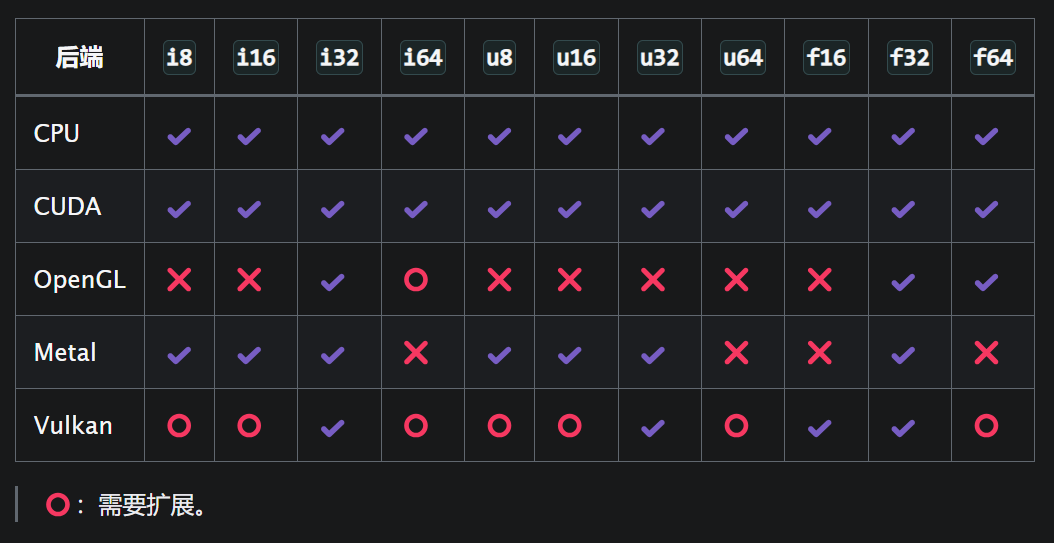
taiqi_type

Taichi 作用域中的数字文字具有默认的整数或浮点类型,允许你在调用init()时指定默认的基本数据类型,并在 Taichi 作用域和 Taichi 数据容器中使用两个名称intfloat分别用作默认整数和浮点类型的别名

1
2
3
4
5
6
7
8
9
10
11
12
ti.init(default_ip=ti.i64)  # Sets the default integer type to ti.i64
ti.init(default_fp=ti.f64) # Sets the default floating-point type to ti.f64

x = ti.field(float, 5)
# 等价于
x = ti.field(ti.f64, 5)

@ti.kernel
def example_cast() -> int: # the returned type is ti.i64
x = 3.14 # x is of ti.f64 type
y = int(x) # equivalent to ti.i64(x)
return y

为了保证工程模拟等应用的高精度,建议将default_fp设置ti.f64
例如,如果默认浮点类型为ti.f32,则数字文字 3.14159265358979 将转换为精度约为 7 位十进制数字的 32 位浮点数

显式类型转换

Taiqi 中一旦声明变量,就无法改变其数据类型。 因此,当原始数据类型无法用于赋值或计算时,可以先将值切换到不同的数据类型,再进行复制与计算。(并非切换变量的数据类型)

使用ti.cast()函数将给定值转换为特定的目标类型

1
variable = ti.cast(variable, type)

例如

1
2
3
4
5
@ti.kernel
def foo():
a = 3.14
b = ti.cast(a, ti.i32) # 3
c = ti.cast(b, ti.f32) # 3.0

也可使用ti.f32ti.i64等基本类型,直接对标量变量执行类型转换

1
2
3
4
5
6
7
@ti.kernel
def foo():
a = 3.14
x = int(a) # 3
y = float(a) # 3.14
z = ti.i32(a) # 3
w = ti.f64(a) # 3.14

隐式类型转化

一般来说,隐式类型转换可能是错误的重要来源。因此,Taichi 强烈反对使用此机制,并建议您为所有变量和操作显式指定所需的数据类型

二元运算中的隐式类型转换规则(优先级由高到低):

  1. 整数 + 浮点 -> 浮点数
  2. 低精度位 + 高精度位 -> 高精度位
  3. 带符号整数 + 无符号整数 -> 无符号整数

出现规则冲突时,最高优先级的规则适用

例外:

  • 位移运算返回 lhs (左侧) 数据类型
  • 逻辑运算返回i32
  • 比较运算返回i32

赋值时的隐式类型转换

当为具有不同数据类型的变量赋值时,会执行隐式类型转换,如果该值的精度高于目标变量,则会显示一条警告,指示潜在的精度损失

1
2
3
4
5
6
7
8
9
@ti.kernel
def foo():
a = 3.14
a = 1
print(a) # 1.0 without warning

b = 1
b = 3.14
print(b) # 3 warning

复合类型

复合类型是用户自定义的数据类型,由多个元素组成。 支持的复合类型包括向量、矩阵、ndarray 和结构体。Taichi 允许你将ti.types模块中提供的所有类型作为脚手架来自定义更高等级的复合类型

矩阵和向量

使用两个函数ti.types.matrix()ti.types.vector()来创建自己的矩阵和向量类型

1
2
myvec4d = ti.types.vector(4, ti.f64)  # a 64-bit floating-point 4D vector type
mymat4x3i = ti.types.matrix(4, 3, int) # a 4x3 integer matrix type

利用自定义复合类型来实例化向量和矩阵,以及注释函数参数和结构成员的数据类型

1
2
3
4
5
6
7
8
9
v = myvec4d(1, 2, 3, 4)  # Create a vector instance, here v = [1.0 2.0 3.0 4.0]

@ti.func
def length(w: vec4d): # vec4d as type hint
return w.norm() #计算向量的欧几里得范数(L2范数)

@ti.kernel
def test():
print(length(v))

对于四维以下的向量,可以使用xyzwrgba来访问向量的内容

1
2
3
4
5
6
7
v = ti.Vector([1, 2, 3, 4])
v.x = 1 # v[0] = 1
v.y = 2 # v[1] = 2
v.z = 3 # v[2] = 3
v.w = 4 # v[3] = 4
v.xyz = 1, 2, 3
v.rgb = 1, 2, 3

结构体类型和数据类(dataclass)

使用函数ti.types.struct()创建结构类型

1
2
3
4
5
6
7
# 例如创建一个结构体类型来表示三维空间中的球体,对球心和半径进行抽象
vec3 = ti.types.vector(3, float)
sphere_type = ti.types.struct(center=vec3, radius=float)
# 初始化球体1,球心位于(0,0,0),半径为 1.0
sphere1 = sphere_type(center=vec3([0, 0, 0]), radius=1.0)
# 初始化球体2,球心位于(1,1,1),半径为 2.0
sphere2 = sphere_type(center=vec3([1, 1, 1]), radius=2.0)

当定义一个具有大量参数的结构体时,使用ti.types.struct可能会导致代码杂乱无章。 可通过@ti.dataclass装饰器,使代码更优雅

1
2
3
4
5
6
7
@ti.dataclass
class Sphere:
center: vec3
radius: float

#等价于
Sphere = ti.types.struct(center=vec3, radius=float)

另外使用@ti.dataclass的还可以在数据类中定义成员函数,从而实现面向对象编程(OOP) 功能

实例化

在对复合类型实例化时,未赋值的参数自动被设为0
在自定义向量和矩阵类型中,用单标量初始化时,会自动将其扩展到所有的元素
但使用预设ti.Vector()ti.Matrix()时需传入类似数列的对象

1
2
3
4
5
6
7
8
9
10
11
12
@ti.dataclass
class Ray:
ro: vec3
rd: vec3
t: float

# 以下初始化均等价
ray = Ray(vec3(0,0,0), vec3(0, 0, 0), 0)
ray = Ray(ro=vec3(0), rd=vec3(0))
ray = Ray(ro=vec3([0, 0, 0]))
ray = Ray(0, 0, 0)
ray = Ray()

类型转换

目前支持类型转换的复合数据类型只有向量和矩阵。 在对向量或矩阵进行类型转换时,是以元素为单位进行的,结果是创建新的向量和矩阵

1
2
3
4
5
@ti.kernel
def foo():
u = ti.Vector([2.3, 4.7])
v = int(u) # ti.Vector([2, 4])
w = ti.cast(u, ti.i32) # ti.Vector([2, 4])

数据容器 Field

Taichi field 是全局数据容器,从Python作用域或Taichi作用域均能访问,其元素可以是标量、向量、矩阵和结构体

Taichi field 支持的维度最高是8D

声明

  • 标量field
1
2
3
4
sf_0d = ti.field(ti.f32, shape=())  # 声明一个零维标量场,只含一个标量
sf_1d = ti.field(ti.i32, shape=9) # 声明一个一维标量场,形状设置成 n 或 (n,)
#sf_1d = ti.field(ti.i32, shape=(9, ))
sf_2d = ti.field(int, shape=(3, 6)) # 声明一个二维标量场,含3x6个标量
  • 向量field
1
2
# 声明一个4x4的二维向量场,每个元素都是3D向量
vf_2d = ti.Vector.field(n=3, dtype=float, shape=(4, 4))
  • 矩阵field
1
2
# Declares a 300x400x500 matrix field, each of its elements being a 3x2 matrix
mf_3d = ti.Matrix.field(n=3, m=2, dtype=ti.f32, shape=(300, 400, 500))

出于性能考虑,建议您将矩阵保持在最小水平
不推荐: ti.Matrix.field(64, 32, dtype=ti.f32, shape=(3, 2))
推荐: ti.Matrix.field(3, 2, dtype=ti.f32, shape=(64, 32))

  • 结构体field
1
2
3
4
5
6
7
8
9
10
11
12
13
14
# Declares a 1D struct field using the ti.Struct.field() method
particle_field = ti.Struct.field({
"pos": ti.math.vec3,
"vel": ti.math.vec3,
"acc": ti.math.vec3,
"mass": float,
}, shape=(10,))

# 也可以先声明一个结构体,再由此构建结构体field
vec3 = ti.math.vec3 # vec3 is a built-in vector type suppied in the `taichi.math` module
particle = ti.types.struct(
pos=vec3, vel=vec3, acc=vec3, mass=float,
)
particle_field = particle.field(shape=(10,))

操作

使用索引运算符[] 来访问 field 中的一个元素

1
2
3
4
5
6
7
8
9
10
11
12
f_2d = ti.field(ti.f32, shape=(4, 4))

@ti.kernel
def loop_over_2d():
for i, j in f_2d:
f_2d[i, j] = i*10 + j

loop_over_2d()
# [[ 0, 1, 2, 3],
# [10, 11, 12, 13],
# [20, 21, 22, 23],
# [30, 31, 32, 33]]

当访问一个零维 field 中的元素时,将 [None] 作为索引,而非[0]

1
2
3
4
5
f_0d = ti.field(ti.f32, shape=())
f_0d[None] = 10.0

f_1d = ti.field(ti.f32, shape=(1, ))
f_1d[0] = 10.0

Taiqi field 不支持切片,会抛出错误Slicing is not supported on ti.field

1
2
3
f_2d[0][3:] = [4, 5, 6]  # Error! You tried to access a slice of the first row, but it is not supported
for x in f_2d[0]: # Error! You tried to access its first row,but it is not supported
...
  • 使用ti.grouped()将多维场索引打包成向量(一般与for循环连用)
1
2
3
sf_3d = ti.field(dtype=ti.f32, shape=(4, 4, 4))
for I in ti.grouped(sf_3d):
sf_3d[I] = I.x + I.y + I.z # I 是一个3D向量,由元素的三维索引组成
  • 使用field.fill()填充标量field的元素
1
2
x = ti.field(int, shape=(5, 5))
x.fill(1) # Sets all elements in x to 1
  • 访问向量field的元素
1
2
3
vf_2d = ti.Vector.field(n=3, dtype=float, shape=(4, 4))
vf_2d[0, 0][0] = 1 # 第一行第一列的向量的第一个分量为1
vf_2d[0, 1].xyz = 1, 2, 3
  • 访问矩阵field的元素
1
2
mf_3d = ti.Matrix.field(n=3, m=2, dtype=ti.f32, shape=(300, 400, 500))
mf_3d[3, 4][0, 1] = 1 # 第三行第四列的矩阵的第一行第二列的值为1
  • 访问结构体field的元素
1
2
3
4
5
6
7
8
9
10
11
12
13
particle_field = ti.Struct.field({
"pos": ti.math.vec3,
"vel": ti.math.vec3,
"acc": ti.math.vec3,
"mass": float,
}, shape=(10,))

# 索引优先
particle_field[0].pos = vec3(0) # particle_field is a 1D struct field, pos is a 3D vector

# 名称优先(创建一个子 field,集合该结构体 field 中所有 `mass` 成员,再用索引操作符 `[]` 访问特定成员)
particle_field.mass[0] = 1.0 # Sets the mass of the first particle in the field to 1.0
particle_field.mass.fill(1.0) # Sets all mass of the particles in the struct field to 1.0
  • 访问field的元数据
1
2
3
4
f_1d.shape  # (1,)
f_1d.dtype # f32

# 也可以同理访问field在声明时的其他参数

Taiqi Lang 学习笔记 基础篇
https://blog.giraffish.me/post/58c38333/
作者
卖柠檬雪糕的鱼
发布于
2024年8月4日
更新于
2025年3月28日
许可协议