从零开始搭建个人博客网站(hexo-fluid+netlify+cloudflare)

🍀 前言

笔者从小就有一个梦想,那就是能拥有一个属于自己的网站,那真的是泰裤辣!!但是对于当时一个连html/css/js是啥都不知道的小白来说有辣么亿点点难…后来我遇见了hexo框架,开箱即用,大大降低了难度,感觉可以尝试一下[捂脸],所以笔者就从零开始,慢慢摸索。而写这篇文章,就是为了记录总结笔者建站(掉坑)的全过程…

✨简介

Hexo是一个快速、简洁且高效的博客框架。Hexo 使用 Markdown(或其他标记语言)解析文章,在几秒内,即可利用靓丽的主题生成静态网页

Fluid是基于 Hexo 的一款 Material Design 风格的主题,由 Fluid-dev 负责开发与维护。

netlify是一个提供托管服务的平台,免费额度充足,速度较快且易于上手

Cloudflare是国外著名的CDN供应商,可以提供免费的DNS服务和SSL证书,用来加速和保护网站

📌准备工作

🔧安装博客

安装Hexo

Hexo官方文档

使用 npm 安装 Hexo:

1
npm install -g hexo-cli

使用淘宝镜像加速 npm config set registry http://registry.npmmirror.com

安装完成后新建博客项目:

1
2
3
hexo init <folder>
cd <folder>
npm install

安装Fluid主题

Fluid用户手册

下载 最新release 版本解压到 themes 目录,并将解压出的文件夹重命名为 fluid

然后在博客目录下创建 _config.fluid.yml,将主题的 _config.yml内容复制过去

如下修改 Hexo 博客目录中的 _config.yml

1
2
3
theme: fluid  # 指定主题

language: zh-CN # 指定语言,会影响主题显示的语言,按需修改

首次使用主题的「关于页」需要手动创建:

1
hexo new page about

创建成功后修改/source/about/index.md,添加layout 属性:

1
2
3
4
5
6
---
title: 标题
layout: about
---

这里写关于页的正文,支持 Markdown, HTML

至此,博客已基本安装完成,以下为常用hexo命令:

1
2
3
4
5
6
7
8
9
10
11
12
13
14
# 生成静态网页
hexo g

#启动服务,默认地址为 http://localhost:4000/ 在浏览器中输入地址即可预览
hexo s

# 删除生成的静态网页
hexo clean

#创建一篇新文章或者新的页面
hexo new [layout] <title>
#文章的布局(layout), 默认为 post,可以通过修改 _config.yml 中的default_layout 参数来指定默认布局
#Hexo 有三种默认布局:post、page 和 draft。在创建这三种不同类型的文件时,它们将会被保存到不同的路径
#而您自定义的其他布局和 post 相同,都将储存到 source/_posts 文件夹

🎨博客配置

Fluid配置文档
修改博客目录下的_config.yml"站点配置" 和 _config.fluid.yml"主题配置" 以配置博客

首页Slogan(打字机) + Hitokoto(一言)

修改主题配置:

1
2
3
4
5
6
7
8
9
10
index:
slogan:
enable: true
text: 这是一条 Slogan
api:
enable: true
url: "https://v1.hitokoto.cn/?c=d"
method: "GET"
headers: {}
keys: ["hitokoto"]

url: 一言的请求接口,参数c为句子类型见下表

参数 说明
a 动画
b 漫画
c 游戏
d 文学
e 原创
f 来自网络
g 其他
h 影视
i 诗词
j 网易云
k 哲学
l 抖机灵
其他值 作为 动画 类处理

可选择多个分类,例如: ?c=a&c=c


LaTeX 数学公式

设置主题配置:

1
2
3
4
5
post:
math:
enable: true
specific: false
engine: katex

更换 Markdown 渲染器:

1
2
3
npm uninstall hexo-renderer-marked --save
npm install hexo-renderer-markdown-it --save
npm install @traptitech/markdown-it-katex --save

然后在站点配置中添加:

1
2
3
markdown:
plugins:
- "@traptitech/markdown-it-katex"

安装完成后执行 hexo clean


安装hexo-abbrlink:

1
npm install hexo-abbrlink --save

修改站点配置:

1
2
#permalink: :year/:month/:day/:title/
permalink: post/:abbrlink/

在主题配置的 footer: content 中添加:

1
2
3
4
5
6
7
8
9
10
11
footer:
content: '
<a href="https://hexo.io" target="_blank" rel="nofollow noopener"><span>Hexo</span></a>
<i class="iconfont icon-love"></i>
<a href="https://github.com/fluid-dev/hexo-theme-fluid" target="_blank" rel="nofollow noopener"><span>Fluid</span></a>
<div style="font-size: 0.85rem">
<span id="timeDate">载入天数...</span>
<span id="times">载入时分秒...</span>
<script src="/js/duration.js"></script>
</div>
'

在博客目录下创建 source/js/duration.js,内容如下:

1
2
3
4
5
6
7
8
9
10
11
12
13
14
15
16
17
18
19
20
21
22
23
24
25
26
27
28
29
30
31
!(function() {
/** 计时起始时间,自行修改 **/
var start = new Date("2020/01/01 00:00:00");

function update() {
var now = new Date();
now.setTime(now.getTime()+250);
days = (now - start) / 1000 / 60 / 60 / 24;
dnum = Math.floor(days);
hours = (now - start) / 1000 / 60 / 60 - (24 * dnum);
hnum = Math.floor(hours);
if(String(hnum).length === 1 ){
hnum = "0" + hnum;
}
minutes = (now - start) / 1000 /60 - (24 * 60 * dnum) - (60 * hnum);
mnum = Math.floor(minutes);
if(String(mnum).length === 1 ){
mnum = "0" + mnum;
}
seconds = (now - start) / 1000 - (24 * 60 * 60 * dnum) - (60 * 60 * hnum) - (60 * mnum);
snum = Math.round(seconds);
if(String(snum).length === 1 ){
snum = "0" + snum;
}
document.getElementById("timeDate").innerHTML = "本站安全运行&nbsp"+dnum+"&nbsp天";
document.getElementById("times").innerHTML = hnum + "&nbsp小时&nbsp" + mnum + "&nbsp分&nbsp" + snum + "&nbsp秒";
}

update();
setInterval(update, 1000);
})();

不要忘记把上面注释的时间改为自己的时间,至此这项功能就引入到

里了。


评论 (Twikoo)

先用netlify部署twikoo

在主题配置中开启并指定评论模块:

1
2
3
4
post:
comments:
enable: true
type: twikoo

在下面配置参数:

1
2
3
twikoo:
envId: https://xxx.netlify.app/.netlify/functions/twikoo
# 将xxx.netlify.app换成自己部署在netlify上的域名

twikoo评论系统就此部署好啦,可以点击评论窗口的“小齿轮”图标,设置管理员密码,进入twikoo管理面板中进行进一步配置和管理


看板娘Live2D

1. 旧版本

只支持Cubism 2.1的旧版模型,不建议使用

安装依赖

1
npm install --save hexo-helper-live2d

安装模型

1
npm install live2d-widget-model-shizuku

模型列表(大部分都很抽象)

  • live2d-widget-model-chitose
  • live2d-widget-model-epsilon2_1
  • live2d-widget-model-gf
  • live2d-widget-model-haru
  • live2d-widget-model-haruto
  • live2d-widget-model-hibiki
  • live2d-widget-model-hijiki
  • live2d-widget-model-izumi
  • live2d-widget-model-koharu
  • live2d-widget-model-miku
  • live2d-widget-model-ni-j
  • live2d-widget-model-nico
  • live2d-widget-model-nietzsche
  • live2d-widget-model-nipsilon
  • live2d-widget-model-nito
  • live2d-widget-model-shizuku
  • live2d-widget-model-tororo
  • live2d-widget-model-tsumiki
  • live2d-widget-model-unitychan
  • live2d-widget-model-wanko
  • live2d-widget-model-z16

修改主题配置

1
2
3
4
5
6
7
8
live2d:
enable: true
model:
use: shizuku
display:
position: left
width: 150
height: 300

2. 新版本(CDN方法)

修改自stevenjoezhang大佬的版本 [2]

支持Cubism 3及以上的版本,可自定义,交互功能丰富

在主题配置的 footer: content 中添加:

1
2
3
4
5
6
footer:
content: '
<!-- PixiJS -->
<script src="https://fastly.jsdelivr.net/npm/pixi.js@7.x/dist/pixi.min.js"></script>
<script src="https://fastly.jsdelivr.net/gh/giraffishh/live2d-widget@master/autoload.js"></script>
'

可以使用 https://blog.jsdmirror.com/ 的公益 jsdelivr 国内CDN加速节点 已经没了
jsdelivr官方节点(慢):gcore.jsdelivr.net testingcf.jsdelivr.net quantil.jsdelivr.net fastly.jsdelivr.net cdn.jsdelivr.net

自定义配置:

首先将项目fork到自己github的仓库中

说明一下几个文件的作用:

文件 作用
autoload.js 自动加载看板娘
waifu.css 看板娘样式
waifu-tips.js 看板娘说话的脚本
waifu-tips.json 看板娘说话的内容
live2d.min.js 加载Cubism 2.1的模型的脚本
live2dcubismcore.min.js 加载Cubism 3及以上的模型的脚本

你可以对照以上文件的查看可选的配置项目。

记得要修改在autoload.js的开头中定义的加载看板娘的路径,将其改成自己仓库的路径

1
const live2d_path = "https://blog.jsdmirror.com/gh/{GitHub用户名}/live2d-widget@master/";

如果要自定义模型,将模型仓库fork到自己github的仓库中就可以往里面添加自己的Live2D模型了

注意要按照原有模型的目录结构放入新模型
然后把模型的组织文件(通常是{模型名}.json)改成index.json才能被正确识别

记得要修改在autoload.js的结尾中定义的模型仓库的路径,将其改成自己模型仓库的路径

1
cdnPath: "https://blog.jsdmirror.com/gh/{GitHub用户名}/live2d_api@master/"

自动更新与上传文章

写了个脚本,可以按照git历史自动覆盖更新文章头部Front-matter中的文章创建日期和更新日期,并自动完成commit和push操作

upload.js

1
2
3
4
5
6
7
8
9
10
11
12
13
14
15
16
17
18
19
20
21
22
23
24
25
26
27
28
29
30
31
32
33
34
35
36
37
38
39
40
41
42
43
44
45
46
47
48
49
50
51
52
53
54
55
56
57
58
59
60
61
62
63
64
65
66
67
68
69
70
71
72
73
74
75
76
77
78
79
80
81
82
83
84
85
86
87
88
89
90
91
92
93
94
95
96
97
98
99
100
101
102
103
104
105
106
107
108
109
110
111
112
113
114
115
116
117
118
119
120
121
122
123
124
125
126
127
128
129
130
131
132
133
134
135
136
137
138
139
140
141
142
143
144
145
146
147
148
149
150
151
152
153
154
155
156
157
158
159
160
161
162
163
164
165
166
167
168
169
170
171
172
173
174
175
176
177
178
179
180
181
182
183
184
185
186
187
188
189
190
191
192
193
194
195
196
197
198
199
200
201
202
203
204
205
206
207
208
209
210
211
212
213
214
215
216
217
218
219
220
221
222
223
224
225
226
227
228
229
230
231
232
233
234
235
236
237
238
239
240
241
242
243
244
245
246
247
248
249
250
251
252
253
254
255
256
257
258
259
260
261
262
263
264
265
266
267
268
269
270
271
272
273
274
275
276
277
278
279
280
281
282
283
284
285
286
287
288
289
290
291
292
293
294
295
296
297
298
299
300
301
302
303
304
305
306
307
308
309
310
311
312
313
314
315
316
317
318
319
320
321
322
323
324
325
326
327
328
329
330
331
332
333
334
335
336
337
338
339
340
341
342
343
344
345
346
347
348
349
350
351
352
353
354
355
356
357
358
359
360
361
362
363
364
365
366
367
368
369
370
371
372
373
374
375
376
377
378
379
380
381
382
383
384
385
386
387
388
389
390
391
392
393
394
395
396
397
398
399
400
401
402
403
404
405
406
407
408
409
410
411
412
413
414
415
416
417
418
419
420
421
422
423
424
425
426
427
428
429
430
431
432
433
434
435
436
437
438
439
440
441
442
443
444
445
446
447
448
449
450
451
452
453
454
455
456
457
458
459
460
461
462
463
464
465
466
467
468
469
470
471
472
473
474
475
476
477
478
479
480
481
482
483
484
485
486
487
488
489
490
491
492
493
494
495
496
497
498
499
500
501
502
503
504
505
506
507
508
509
510
511
512
513
514
515
516
517
518
519
520
521
522
523
524
525
526
527
528
529
530
531
532
533
534
535
536
537
538
539
540
541
542
543
544
545
546
547
548
549
550
551
552
553
554
555
556
557
558
559
560
561
562
563
564
565
566
567
568
569
570
571
572
573
574
575
576
577
578
579
580
581
582
583
584
585
586
587
588
589
590
591
592
593
594
595
596
#!/usr/bin/env node
'use strict';

const { execSync } = require('child_process');
const moment = require('moment-timezone');
const path = require('path');
const fs = require('fs');

moment.tz.setDefault('Asia/Shanghai');

// 特定的提交消息前缀,用于标记自动更新时间的提交
const AUTO_UPDATE_PREFIX = '[AUTO-UPDATE-TIME]';

// 默认配置
const DEFAULT_CONFIG = {
postsDir: './source/_posts', // 默认文章目录
sourceDir: '.', // 默认源码目录
dryRun: false,
dateOnly: false,
updatedOnly: false,
noCommit: false,
noPush: false // 默认推送,添加不推送选项
};

function printUsage() {
console.log(`
Usage: node upload [options]

Options:
--posts-dir <dir> Posts directory (default: ./source/_posts)
--source-dir <dir> Source directory (default: .)
--dry Show what would be updated without making changes
--date-only Only update date field
--updated-only Only update updated field
--no-commit Do not auto-commit after updates
--no-push Do not push to remote after updating dates (default: push enabled)
--help Show this help message

Examples:
node upload # Update dates and push to remote
node upload --dry # Dry run (Update dates)
node upload --no-push # Update dates but don't push
node upload --date-only # Only update date field and push
node upload --no-commit # Update dates but don't commit or push
`);
}

function parseArgs() {
const args = process.argv.slice(2);
const config = { ...DEFAULT_CONFIG };

for (let i = 0; i < args.length; i++) {
const arg = args[i];

switch (arg) {
case '--help':
case '-h':
printUsage();
process.exit(0);
break;
case '--posts-dir':
config.postsDir = args[++i];
break;
case '--source-dir':
config.sourceDir = args[++i];
break;
case '--dry':
config.dryRun = true;
break;
case '--date-only':
config.dateOnly = true;
break;
case '--updated-only':
config.updatedOnly = true;
break;
case '--no-commit':
config.noCommit = true;
break;
case '--no-push':
config.noPush = true;
break;
default:
console.error(`Unknown option: ${arg}`);
printUsage();
process.exit(1);
}
}

return config;
}

function checkGitStatus(sourceDir) {
try {
// 使用 -z 选项获取以空字符分隔的输出,避免文件名中的特殊字符问题
const status = execSync('git status --porcelain -z', {
cwd: sourceDir,
encoding: 'utf8'
});
return status;
} catch (error) {
throw new Error(`Failed to check git status: ${error.message}`);
}
}

function parseGitStatus(statusOutput) {
if (!statusOutput) return [];

// 使用空字符分割,过滤空字符串
return statusOutput.split('\0')
.filter(line => line.trim())
.map(line => {
const status = line.substring(0, 2);
const filePath = line.substring(3);
let statusDesc = '';

if (status.includes('M')) statusDesc = 'Modified';
else if (status.includes('A')) statusDesc = 'Added';
else if (status.includes('D')) statusDesc = 'Deleted';
else if (status.includes('R')) statusDesc = 'Renamed';
else if (status.includes('??')) statusDesc = 'Untracked';
else statusDesc = 'Changed';

// 规范化路径分隔符,统一使用正斜杠显示
const normalizedPath = filePath.replace(/\\/g, '/');

return { status: statusDesc, path: normalizedPath };
});
}

function commitWorkingChanges(sourceDir) {
try {
console.log('📝 Committing existing working directory changes...');

// 获取详细的状态信息
const statusOutput = checkGitStatus(sourceDir);
const changedFiles = parseGitStatus(statusOutput);

if (changedFiles.length > 0) {
console.log(' Files to be committed:');
changedFiles.forEach(file => {
console.log(` ${file.status}: ${file.path}`);
});
}

// 添加所有更改到暂存区
execSync('git add .', { cwd: sourceDir });

// 提交更改,使用简单消息
execSync('git commit -m "[AUTO-PRECOMMIT]"', { cwd: sourceDir });

console.log(`✅ Pre-update commit completed (${changedFiles.length} files)`);
return true;
} catch (error) {
console.error(`❌ Error committing working changes: ${error.message}`);
return false;
}
}

function pushToRemote(sourceDir) {
try {
console.log('🚀 Pushing to remote repository...');

// 获取当前分支名
const currentBranch = execSync('git branch --show-current', {
cwd: sourceDir,
encoding: 'utf8'
}).trim();

if (!currentBranch) {
throw new Error('Could not determine current branch');
}

// 推送到远端
execSync(`git push origin ${currentBranch}`, { cwd: sourceDir });

console.log(`✅ Successfully pushed to remote branch: ${currentBranch}`);
return true;
} catch (error) {
console.error(`❌ Error pushing to remote: ${error.message}`);
console.log('💡 You may need to manually push the changes later');
return false;
}
}

function main() {
const config = parseArgs();

console.log('🚀 Force updating ALL dates from Git history...');
console.log(` Mode: ${config.dryRun ? 'DRY RUN' : 'ACTUAL UPDATE'}`);
console.log(` Scope: ${config.dateOnly ? 'DATE ONLY' : config.updatedOnly ? 'UPDATED ONLY' : 'BOTH FIELDS'}`);
console.log(` Posts directory: ${config.postsDir}`);
console.log(` Source directory: ${config.sourceDir}`);
console.log(` Auto-commit: ${config.noCommit ? 'DISABLED' : 'ENABLED'}`);
console.log(` Push to remote: ${config.noPush ? 'DISABLED' : 'ENABLED'}`);

const postsDir = path.resolve(config.postsDir);
const sourceDir = path.resolve(config.sourceDir);

if (!fs.existsSync(postsDir)) {
console.log(`❌ Posts directory not found: ${postsDir}`);
console.log('💡 Use --posts-dir to specify the correct path');
return;
}

// 检查是否在 Git 仓库中
try {
execSync('git rev-parse --git-dir', { cwd: sourceDir, stdio: 'ignore' });
} catch (error) {
console.log(`❌ Not in a Git repository: ${sourceDir}`);
console.log('💡 Use --source-dir to specify the correct Git repository path');
return;
}

// 跟踪是否有预提交发生
let hasPreCommit = false;

// 如果不是干跑模式,检查工作区状态并提交现有更改
if (!config.dryRun) {
const gitStatus = checkGitStatus(sourceDir);

if (gitStatus.trim()) {
console.log('\n📋 Working directory has uncommitted changes');

if (!commitWorkingChanges(sourceDir)) {
console.log('❌ Failed to commit working changes. Aborting to avoid conflicts.');
return;
}
hasPreCommit = true;
console.log('');
} else {
console.log('✅ Working directory is clean, proceeding...\n');
}
}

const files = getMarkdownFiles(postsDir);
console.log(`📁 Found ${files.length} markdown files\n`);

let processedCount = 0;
let updatedCount = 0;
let noChangeCount = 0;
const updatedFiles = [];
const dateUpdates = [];

files.forEach(file => {
const relativePath = path.relative(sourceDir, file);
// 规范化路径显示,统一使用正斜杠
const displayPath = relativePath.replace(/\\/g, '/');
processedCount++;

try {
const result = forceUpdateGitDates(file, sourceDir, {
dryRun: config.dryRun,
dateOnly: config.dateOnly,
updatedOnly: config.updatedOnly
});

if (result.hasChanges) {
updatedCount++;
updatedFiles.push(relativePath);

console.log(`📄 ${displayPath}`);
console.log(` ✅ ${config.dryRun ? 'Would update' : 'Updated'}:`);

if (result.dateChanged) {
console.log(` 📅 date: "${result.oldDate || 'none'}""${result.newDate}"`);
dateUpdates.push({
file: displayPath,
field: 'date',
oldValue: result.oldDate || 'none',
newValue: result.newDate
});
}
if (result.updatedChanged) {
console.log(` 🔄 updated: "${result.oldUpdated || 'none'}""${result.newUpdated}"`);
dateUpdates.push({
file: displayPath,
field: 'updated',
oldValue: result.oldUpdated || 'none',
newValue: result.newUpdated
});
}
console.log('');
} else {
noChangeCount++;
if (result.noGitHistory) {
console.log(`📄 ${displayPath} - ⚠️ No Git history`);
}
// 对于不需要更新的文件,不显示任何信息以保持简洁
}

} catch (error) {
console.error(`📄 ${displayPath} - ❌ Error: ${error.message}`);
}
});

// 自动提交更新的文件
if (!config.dryRun && !config.noCommit && updatedFiles.length > 0) {
try {
console.log('🔄 Auto-committing updated files...');
console.log(' Files to be committed:');
updatedFiles.forEach(file => {
// 显示时使用正斜杠,但提交时使用原始路径
const displayPath = file.replace(/\\/g, '/');
console.log(` Modified: ${displayPath}`);
});

// 添加所有更新的文件到暂存区
updatedFiles.forEach(file => {
execSync(`git add "${file}"`, { cwd: sourceDir });
});

// 提交,使用特定前缀标记
const commitMessage = `${AUTO_UPDATE_PREFIX} Update timestamps for ${updatedFiles.length} files`;
execSync(`git commit -m "${commitMessage}"`, { cwd: sourceDir });

console.log(`✅ Auto-committed ${updatedFiles.length} files`);
} catch (error) {
console.error(`❌ Error auto-committing: ${error.message}`);
}
}

// 推送到远端逻辑:只要有预提交或者有日期更新,就push
const shouldPush = !config.dryRun && !config.noPush && !config.noCommit && (hasPreCommit || updatedFiles.length > 0);

if (shouldPush) {
console.log('');
pushToRemote(sourceDir);
}

console.log(`\n📊 Summary:`);
console.log(` Processed: ${processedCount} files`);
console.log(` ${config.dryRun ? 'Would update' : 'Updated'}: ${updatedCount} files`);
console.log(` No changes needed: ${noChangeCount} files`);

if (config.dryRun) {
console.log(`\n💡 This was a dry run. Run without --dry to actually update files.`);
} else {
console.log(`\n🎉 Done! You may need to regenerate your site to see the changes.`);
if (shouldPush) {
console.log(`📡 Changes have been pushed to remote repository.`);
} else if (config.noPush) {
console.log(`💡 Changes were not pushed (--no-push specified).`);
} else if (config.noCommit) {
console.log(`💡 Changes were not committed or pushed (--no-commit specified).`);
} else if (!hasPreCommit && updatedFiles.length === 0) {
console.log(`💡 No commits were made, so nothing to push.`);
}
}
}

// 辅助函数:将日期字符串转换为moment对象进行比较
function parseDate(dateStr) {
if (!dateStr) return null;

// 尝试多种可能的日期格式
const formats = [
'YYYY-MM-DD HH:mm:ss',
'YYYY-MM-DD HH:mm',
'YYYY-MM-DD',
moment.ISO_8601
];

for (const format of formats) {
const parsed = moment.tz(dateStr, format, 'Asia/Shanghai');
if (parsed.isValid()) {
return parsed;
}
}

return null;
}

// 辅助函数:比较两个日期是否相同(精确到秒)
function datesAreEqual(date1, date2) {
const parsed1 = parseDate(date1);
const parsed2 = parseDate(date2);

if (!parsed1 || !parsed2) return false;

// 比较到秒级别
return parsed1.format('YYYY-MM-DD HH:mm:ss') === parsed2.format('YYYY-MM-DD HH:mm:ss');
}

function forceUpdateGitDates(filePath, sourceDir, options = {}) {
const content = fs.readFileSync(filePath, 'utf8');

// Parse Front Matter
const frontMatterRegex = /^(---\s*\n)([\s\S]*?)(\n---\s*\n)([\s\S]*)$/;
const match = content.match(frontMatterRegex);

if (!match) {
throw new Error('No front matter found');
}

const [, startDelimiter, frontMatterContent, endDelimiter, bodyContent] = match;

// Parse existing dates
const dateMatch = frontMatterContent.match(/^date:\s*(.*)$/m);
const updatedMatch = frontMatterContent.match(/^updated:\s*(.*)$/m);

const oldDate = dateMatch ? dateMatch[1].trim().replace(/['"]/g, '') : null;
const oldUpdated = updatedMatch ? updatedMatch[1].trim().replace(/['"]/g, '') : null;

// Get Git times (excluding auto-update commits)
const gitCreateDate = getGitCreateDate(filePath, sourceDir);
const gitUpdateDate = getGitUpdateDate(filePath, sourceDir);

if (!gitCreateDate && !gitUpdateDate) {
return {
hasChanges: false,
noGitHistory: true,
dateChanged: false,
updatedChanged: false,
oldDate,
oldUpdated,
newDate: oldDate,
newUpdated: oldUpdated
};
}

let newFrontMatter = frontMatterContent;
let dateChanged = false;
let updatedChanged = false;
let newDate = oldDate;
let newUpdated = oldUpdated;

// 检查并更新 date 字段
if (gitCreateDate && !options.updatedOnly) {
const gitDateString = gitCreateDate.format('YYYY-MM-DD HH:mm:ss');

if (!datesAreEqual(gitDateString, oldDate)) {
newDate = gitDateString;

if (dateMatch) {
newFrontMatter = newFrontMatter.replace(/^date:\s*.*$/m, `date: ${newDate}`);
} else {
// Add after abbrlink if exists, otherwise at the end
const abbrRegex = /^(abbrlink:\s*.*)$/m;
if (abbrRegex.test(newFrontMatter)) {
newFrontMatter = newFrontMatter.replace(abbrRegex, `$1\ndate: ${newDate}`);
} else {
newFrontMatter += `\ndate: ${newDate}`;
}
}
dateChanged = true;
}
}

// 检查并更新 updated 字段
if (gitUpdateDate && !options.dateOnly) {
const gitUpdatedString = gitUpdateDate.format('YYYY-MM-DD HH:mm:ss');

if (!datesAreEqual(gitUpdatedString, oldUpdated)) {
newUpdated = gitUpdatedString;

if (updatedMatch) {
newFrontMatter = newFrontMatter.replace(/^updated:\s*.*$/m, `updated: ${newUpdated}`);
} else {
// Add after date if exists, otherwise at the end
const dateRegex = /^(date:\s*.*)$/m;
if (dateRegex.test(newFrontMatter)) {
newFrontMatter = newFrontMatter.replace(dateRegex, `$1\nupdated: ${newUpdated}`);
} else {
newFrontMatter += `\nupdated: ${newUpdated}`;
}
}
updatedChanged = true;
}
}

// Write file
const hasChanges = dateChanged || updatedChanged;
if (hasChanges && !options.dryRun) {
const newContent = startDelimiter + newFrontMatter + endDelimiter + bodyContent;
fs.writeFileSync(filePath, newContent, 'utf8');
}

return {
hasChanges,
noGitHistory: false,
dateChanged,
updatedChanged,
oldDate,
oldUpdated,
newDate,
newUpdated
};
}

function getMarkdownFiles(dir) {
const files = [];

function scanDir(currentDir) {
const items = fs.readdirSync(currentDir);

items.forEach(item => {
const fullPath = path.join(currentDir, item);
const stat = fs.statSync(fullPath);

if (stat.isDirectory()) {
scanDir(fullPath);
} else if (path.extname(item) === '.md') {
files.push(fullPath);
}
});
}

scanDir(dir);
return files;
}

function getGitCreateDate(filePath, sourceDir) {
try {
// 只排除自动更新时间的提交
const cmd = `git log --follow --format="%ct|%s" -- "${filePath}"`;
const output = execSync(cmd, {
encoding: 'utf8',
timeout: 10000,
cwd: sourceDir
}).trim();

if (!output) return null;

const commits = output.split('\n')
.map(line => line.trim())
.filter(line => line)
.map(line => {
const [timestamp, message] = line.split('|');
return { timestamp: parseInt(timestamp, 10), message: message || '' };
})
.filter(commit =>
!commit.message.startsWith(AUTO_UPDATE_PREFIX) &&
!isNaN(commit.timestamp)
);

if (commits.length === 0) return null;

const firstCommit = commits[commits.length - 1];
return moment.unix(firstCommit.timestamp).tz('Asia/Shanghai');

} catch (error) {
console.log(` ⚠️ Git create date error: ${error.message}`);
return null;
}
}

function getGitUpdateDate(filePath, sourceDir) {
try {
// 只排除自动更新时间的提交,获取最新的非自动更新提交
const cmd = `git log --format="%ct|%s" -- "${filePath}"`;
const output = execSync(cmd, {
encoding: 'utf8',
timeout: 10000,
cwd: sourceDir
}).trim();

if (!output) return null;

const commits = output.split('\n')
.map(line => line.trim())
.filter(line => line)
.map(line => {
const [timestamp, message] = line.split('|');
return { timestamp: parseInt(timestamp, 10), message: message || '' };
})
.filter(commit =>
!commit.message.startsWith(AUTO_UPDATE_PREFIX) &&
!isNaN(commit.timestamp)
);

if (commits.length === 0) return null;

const latestCommit = commits[0];
return moment.unix(latestCommit.timestamp).tz('Asia/Shanghai');

} catch (error) {
console.log(` ⚠️ Git update date error: ${error.message}`);
return null;
}
}

// 如果是直接运行此脚本(而不是被 require)
if (require.main === module) {
main();
}

module.exports = {
main,
forceUpdateGitDates,
getMarkdownFiles,
getGitCreateDate,
getGitUpdateDate,
checkGitStatus,
commitWorkingChanges,
pushToRemote
};

用法:

1
2
3
4
5
6
7
8
9
10
11
12
13
14
15
Options:
--posts-dir <dir> Posts directory (default: ./source/_posts)
--source-dir <dir> Source directory (default: .)
--dry Show what would be updated without making changes
--date-only Only update date field
--updated-only Only update updated field
--no-commit Do not auto-commit after updates
--no-push Do not push to remote after updating dates (default: push enabled)
--help Show this help message
Examples:
node upload # Update dates and push to remote
node upload --dry # Dry run (Update dates)
node upload --no-push # Update dates but don't push
node upload --date-only # Only update date field and push
node upload --no-commit # Update dates but don't commit or push

📤部署至netlify

笔者喜欢使用Sourcetree管理git仓库

在github中新建一个公开仓库,克隆到本地,将博客目录内所有内容移入本地仓库,再推送至回远端
然后在netlify中部署该仓库(与部署twikoo同理)

具体可以参考:

📍设置域名

免费域名

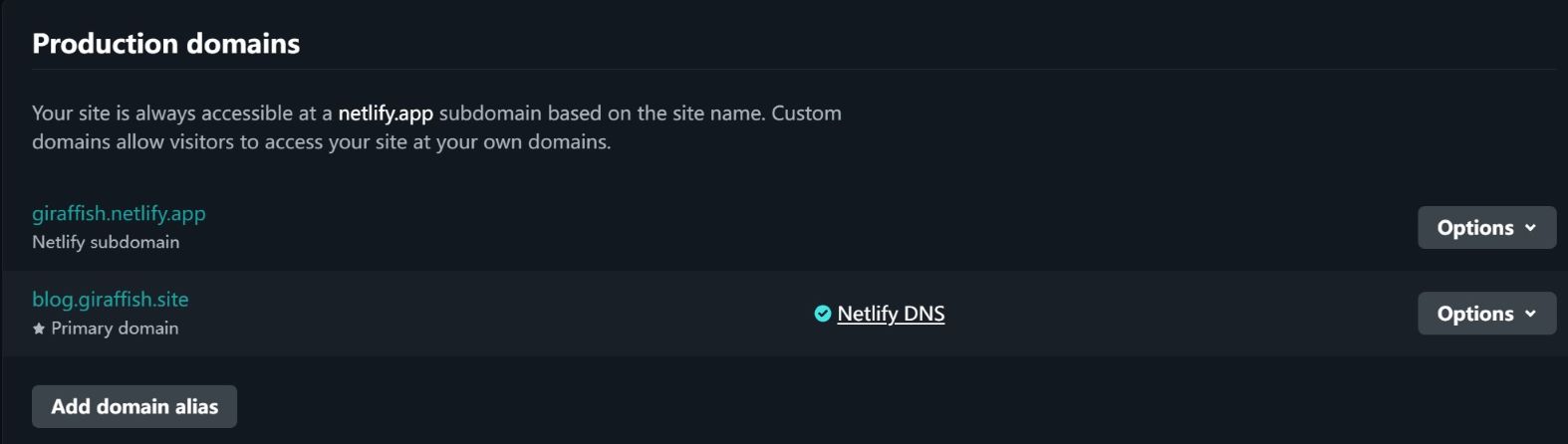
netlifyDomain management中可以设置一个系统分配的二级域名xxx.netlify.app

私人域名

可以在阿里云、腾讯云等域名注册商购买域名,笔者以阿里云为例

使用阿里云DNS解析域名

阿里云提供了免费版的域名解析服务,但不包括SSL证书,访问时浏览器会提示网站不安全

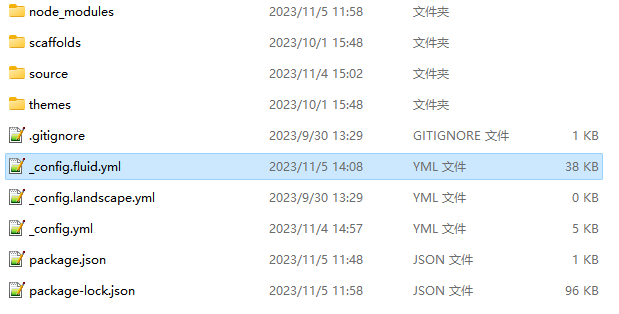
购买后在域名解析处,添加以下记录(笔者另加了blog.xxx.xxx的二级域名),指向Netlify分配的二级域名

0d37b84a644204bbd13b018383ed7866.jpeg

使用 Cloudflare DNS 解析域名

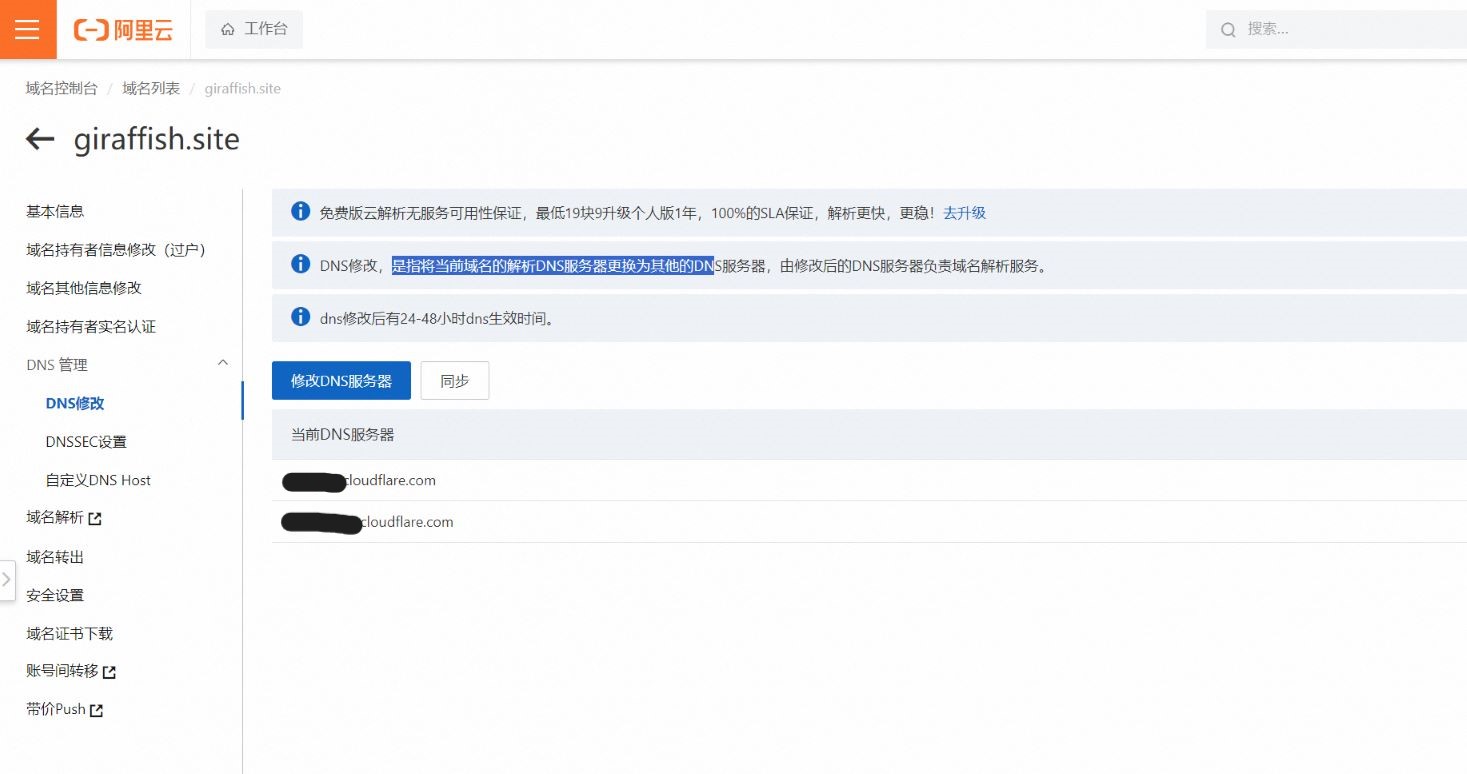
在阿里云域名 > 管理 > DNS修改 更改DNS服务器(名称服务器)为Cloudflare提供的名称服务器

ddc950191db2e3ab68a02c309d7c653f.jpeg

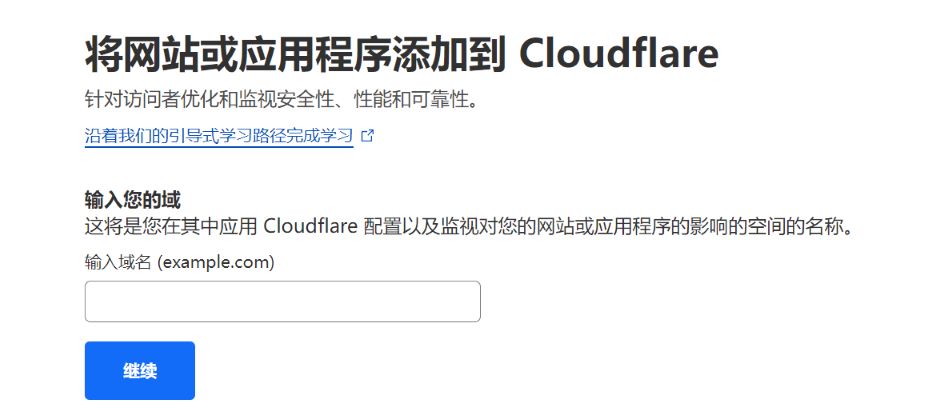
Cloudflare中添加购买的域名

c87c74bc59a6c96cb7bcf28114ef3e76.jpeg

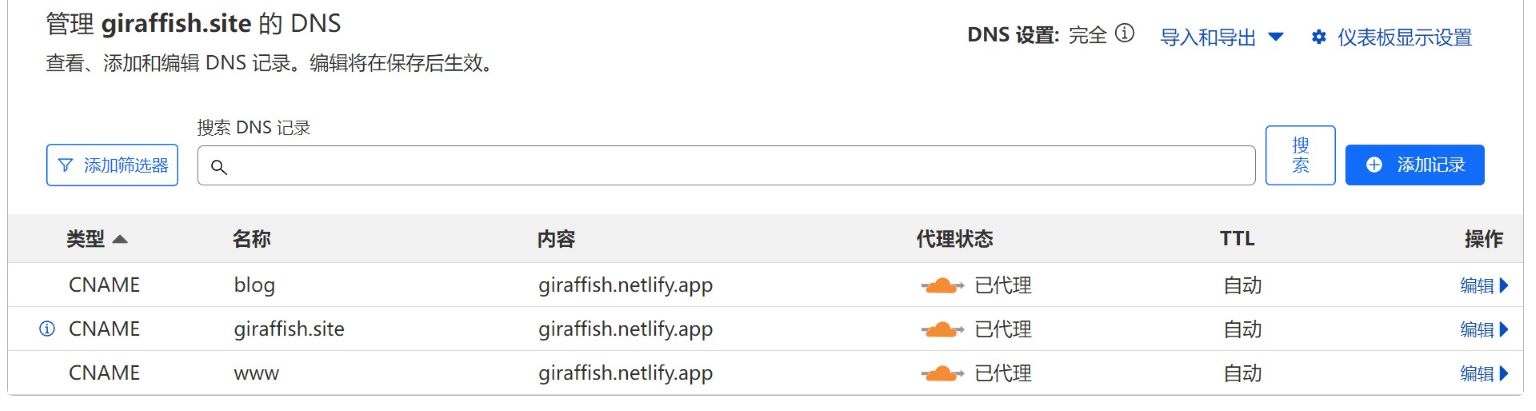
添加DNS记录(笔者另加了blog.xxx.xxx的二级域名),指向Netlify分配的二级域名

be9615705bfa14b60895251bdfbfcc8d.jpeg

名称中填入@即解析主域名

如果你的网站页面在加载的时候,进度条在最后卡住,尝试关闭Cloudflare的Rocket Loader™功能
其他功能能开的就看着开吧,反正免费


最后在netlifyDomain management添加购买的域名

d800729b8092dfad88a094338a825c5b.jpeg

✏️Hexo Netlify CMS 在线编辑博客[6]

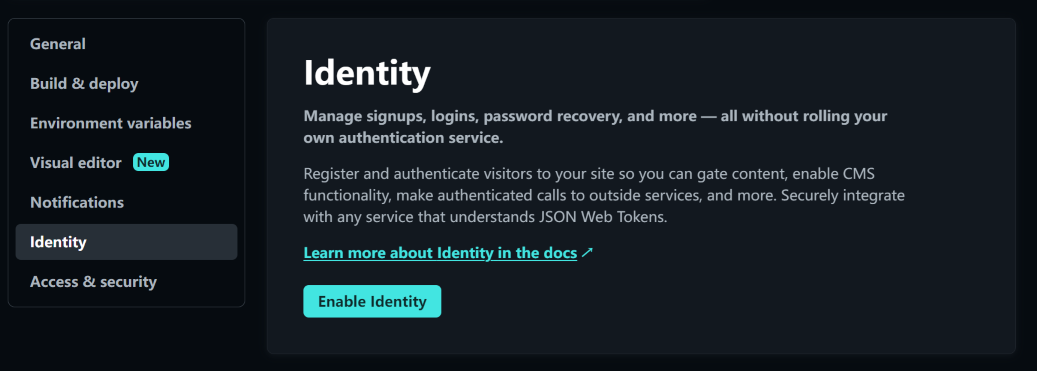
在netlify的Site configuration中开启Identity

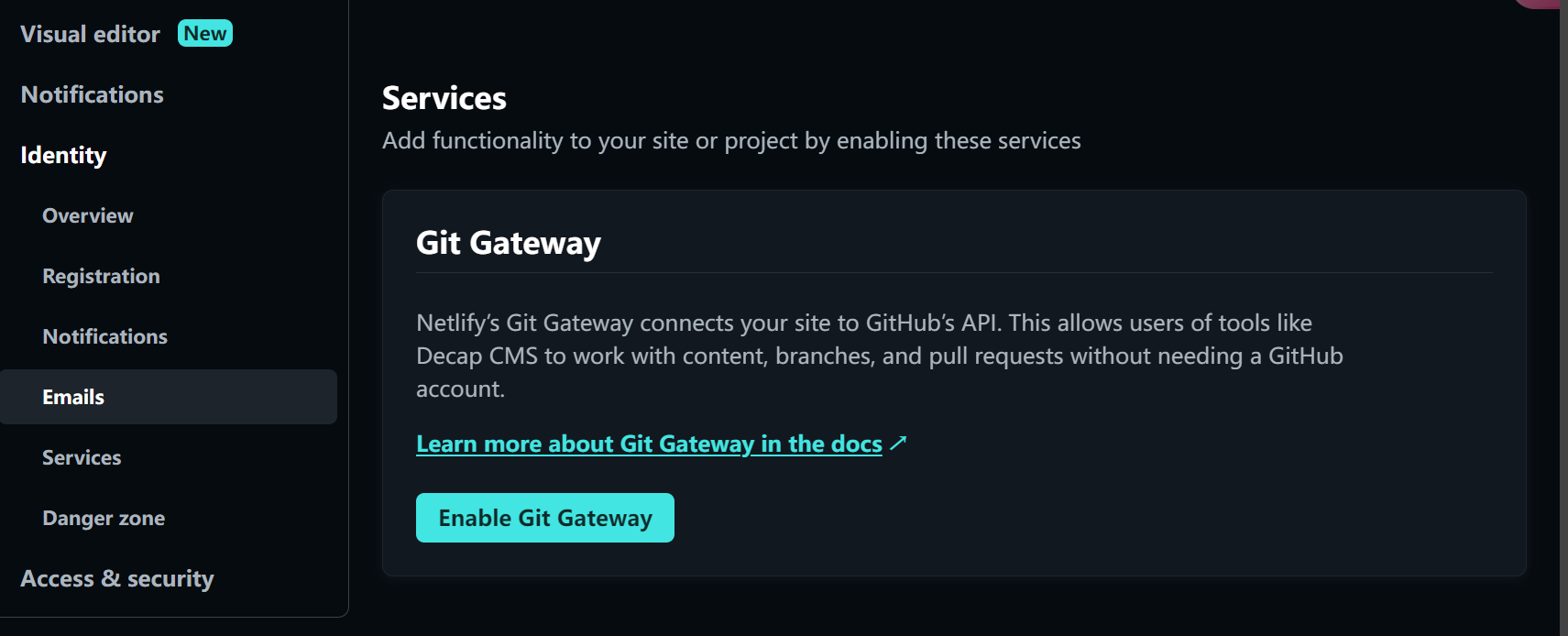
下滑找到Git Gateway开启

修改博客目录下的_config.yml

1
skip_render: admin/*

在博客项目的source文件夹中,创建admin文件夹,并新建两个文件index.htmlconfig.yml于其中

index.html中添加以下内容:

1
2
3
4
5
6
7
8
9
10
11
12
13
14
15
16
17
<!doctype html>
<html>

<head>
<meta charset="utf-8" />
<meta name="viewport" content="width=device-width, initial-scale=1.0" />
<meta http-equiv="x-UA-Compatible" content="IE=Edge">
<meta name="apple-mobile-web-app-status-bar-style" content="white" />
<script type="text/javascript" src="https://identity.netlify.com/v1/netlify-identity-widget.js"></script>
<title>CMS-在线编辑博客</title>
</head>

<body>
<script defer="true" src="https://cdn.jsdelivr.net/npm/netlify-cms@2/dist/netlify-cms.js"></script>
</body>

</html>

config.yml中添加如下内容

1
2
3
4
5
6
7
8
9
10
11
12
13
14
15
16
17
18
19
20
21
22
23
24
25
26
27
28
29
30
31
32
33
34
35
36
37
38
39
40
41
42
43
44
45
46
47
48
49
50
51
52
53
54
55
56
57
58
59
60
61
62
63
64
65
66
67
68
69
70
71
72
73
74
75
76
77
78
79
80
81
82
83
84
85
86
87
88
89
90
91
92
93
94
95
96
97
98
99
100
101
102
103
104
105
106
107
108
109
110
111
112
113
114
115
116
117
118
119
120
121
122
123
124
125
126
127
128
129
130
131
132
133
134
135
136
137
138
139
140
141
142
143
144
145
146
147
148
149
150
151
152
153
154
155
156
157
158
159
160
161
162
163
164
165
166
167
168
169
170
171
172
173
174
175
176
177
178
179
180
181
182
183
184
185
186
187
188
189
190
191
192
193
194
backend:
# name: test-repo # 测试专用 https://www.netlifycms.org/docs/test-backend/
name: git-gateway # https://www.netlifycms.org/docs/git-gateway-backend/
branch: main # 要更新的分支(可选;默认为主分支)
squash_merges: true # 合并提交

local_backend: true

# This line should *not* be indented
publish_mode: editorial_workflow

# This line should *not* be indented
media_folder: "source/images/uploads" # 媒体文件将存储在图片/上载下的Repo中。
public_folder: "/images/uploads" # 上传的媒体的src属性将以/images/uploads开头。

locale: "zh_Hans" # 语言环境 https://github.com/netlify/netlify-cms/tree/master/packages/netlify-cms-locales/src

collections: # https://www.netlifycms.org/docs/configuration-options/#collections
- name: "posts" # 在路由中使用,例如:/admin/collections/blog。
label: "Post" # 在用户界面中使用
folder: "source/_posts" # 存储文件的文件夹的路径。
create: true # 允许用户在这个集合中创建新的文件。
fields: # 每份文件的字段,通常是前面的内容。
- {label: "顶部图", name: "banner_img", widget: "image", required: false}
- {label: "文章封面", name: "index_img", widget: "image", required: false}
- {label: "文章排序", name: "sticky", widget: "number", required: false, hint: "数值越大,该文章越靠前"}
- {label: "标题", name: "title", widget: "string" }
- {label: "发布日期", name: "date", widget: "datetime", format: "YYYY-MM-DD HH:mm:ss", dateFormat: "YYYY-MM-DD", timeFormat: "HH:mm:ss", required: false}
- {label: "更新日期", name: "updated", widget: "datetime", format: "YYYY-MM-DD HH:mm:ss", dateFormat: "YYYY-MM-DD", timeFormat: "HH:mm:ss", required: false}
- {label: "标签", name: "tags", widget: "list", required: false}
- {label: "分类", name: "categories", widget: "list", required: false}
- {label: "关键词", name: "keywords", widget: "list", required: false}
- {label: "摘要", name: "excerpt", widget: "string", required: false}
- {label: "永久链接", name: "permalink", widget: "string", required: false}
- {label: "评论", name: "comments", widget: "boolean", default: true, required: false}
- {label: "内容", name: "body", widget: "markdown", required: false}

- name: "pages"
label: "Pages"
files:
- file: "source/about/index.md"
name: "about"
label: "关于"
fields:
- {label: "标题", name: "title", widget: "string"}
- {label: "内容", name: "body", widget: "markdown", required: false}
- {label: "评论", name: "comments", widget: "boolean", default: true, required: false}

# 如切换主题,请删除以下选项或自行配置,默认仅配置了fluid主题
- name: "settings"
label: "settings"
files:
- file: "source/_data/fluid_config.yml"
name: "fluid"
label: "fluid主题配置"
editor:
preview: false # 是否开启编辑预览
fields:
- label: "导航栏"
name: "navbar"
widget: "object"
collapsed: true # 是否折叠显示
fields:
- {label: "博客名", name: "blog_title", widget: "string", required: false}
- {label: "毛玻璃特效", name: "ground_glass", widget: "boolean", default: true, required: false}
- label: "首页"
name: "index"
widget: "object"
collapsed: true # 是否折叠显示
fields:
- label: "顶部图"
name: "banner_img"
widget: "image"
default: "/img/default.png"
- label: "高度"
name: "banner_img_height"
widget: "number"
- label: "副标题"
name: "slogan"
widget: "object"
fields:
- {label: "修改副标题", name: "text", widget: "string", required: false}
- label: "文章页"
name: "post"
widget: "object"
collapsed: true
fields:
- label: "顶部图(默认)"
name: "banner_img"
widget: "image"
default: "/img/default.png"
- label: "高度"
name: "banner_img_height"
widget: "number"
- label: "文章封面图(默认)"
name: "default_index_img"
widget: "image"
- label: "归档页"
name: "archive"
widget: "object"
collapsed: true
fields:
- label: "顶部图"
name: "banner_img"
widget: "image"
default: "/img/default.png"
- label: "高度"
name: "banner_img_height"
widget: "number"
- label: "副标题"
name: "subtitle"
widget: "string"
required: false
- label: "分类页"
name: "category"
widget: "object"
collapsed: true
fields:
- label: "顶部图"
name: "banner_img"
widget: "image"
default: "/img/default.png"
- label: "高度"
name: "banner_img_height"
widget: "number"
- label: "副标题"
name: "subtitle"
widget: "string"
required: false
- label: "标签页"
name: "tag"
widget: "object"
collapsed: true
fields:
- label: "顶部图"
name: "banner_img"
widget: "image"
default: "/img/default.png"
- label: "高度"
name: "banner_img_height"
widget: "number"
- label: "副标题"
name: "subtitle"
widget: "string"
required: false
- label: "关于页"
name: "about"
widget: "object"
collapsed: true
fields:
- label: "顶部图"
name: "banner_img"
widget: "image"
default: "/img/default.png"
- label: "高度"
name: "banner_img_height"
widget: "number"
- label: "副标题"
name: "subtitle"
widget: "string"
required: false
- label: "作者头像"
name: "avatar"
widget: "image"
- label: "博客名称"
name: "name"
widget: "string"
- label: "网站描述"
name: "intro"
widget: "string"
- label: "友链页面"
name: "links"
widget: "object"
collapsed: true
fields:
- label: "顶部图"
name: "banner_img"
widget: "image"
default: "/img/default.png"
- label: "高度"
name: "banner_img_height"
widget: "number"
- label: "副标题"
name: "subtitle"
widget: "string"
required: false
- label: "添加友链"
name: "items"
widget: "list"
fields:
- {label: "网站名称", name: "title", widget: "string", required: true}
- {label: "网址描述", name: "intro", widget: "string", required: false}
- {label: "网站地址", name: "link", widget: "string", required: true}
- {label: "网站头像", name: "avatar", widget: "image", required: true}

创建source\_data\fluid_config.yml,修改并添加以下内容:

1
2
3
4
5
6
7
8
9
10
11
12
13
14
15
16
17
18
19
20
21
22
23
24
25
26
27
28
29
30
31
32
33
34
35
36
37
38
39
40
41
navbar:
blog_title: 博客标题
ground_glass:
enable: true
index:
banner_img: #背景图
banner_img_height: 100
slogan:
text: 标语
post:
banner_img: #文章页图
banner_img_height: 85
default_index_img: #文章封面图
archive:
banner_img: #归档页图
banner_img_height: 80
subtitle: null
category:
banner_img: #分类页图
banner_img_height: 80
subtitle: null
tag:
banner_img: #标签页图
banner_img_height: 80
subtitle: null
about:
banner_img: #关于页图
banner_img_height: 80
subtitle: null
avatar: #头像
name: 用户名
intro: 介绍下自己
links:
banner_img: /images/uploads/1616421416500-wallhaven-rddv31.jpg
banner_img_height: 80
subtitle: null
items:
- title: Fluid Repo
intro: 主题 GitHub 仓库
link: https://github.com/fluid-dev/hexo-theme-fluid
avatar: /img/favicon.png

各个页面的背景图可以在里面修改,可以是图片的直链,也可以是本地图片的相对路径(以/img/开头)

本地图片应放置在博客目录中/source/img/里面,图片过大会严重拖慢页面加载

可以在主题配置中修改导航栏的菜单,添加或删去admin的按钮

1
2
3
navbar:
menu:
- { key: 'Admin', link: '/admin/', icon: "iconfont icon-pen" }

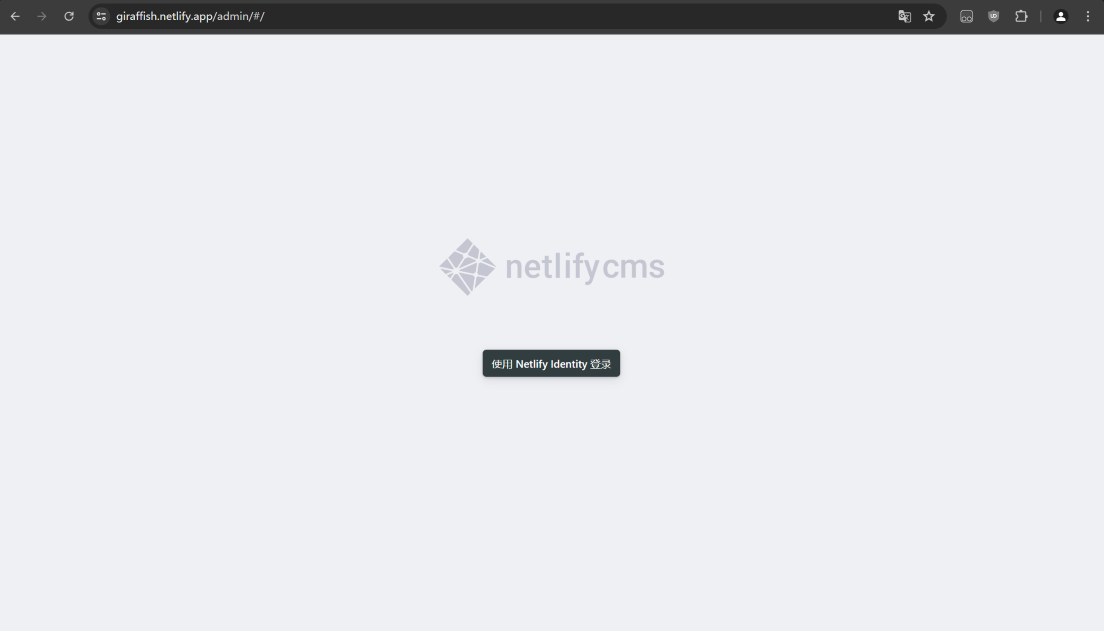
打开部署好的博客网站,进入CMS,注册一个账号

然后回到netlify的Site configuration > Identity 中将Registration preferences修改为Invite only关闭注册通道

至此Netlify CMS配置就算完成了,只要推送代码,等待片刻,通过你部署在 Netlify 上的域名,加/admin/即可访问你的博客后台。

🖼️图床

通过将图片存储在图床中,通过直链访问,而非直接放在博客中,来提高网站的加载速度,并使网站中的图片更易于管理

免费的图床稳定性未知,有删图的风险,且加载速度一般

如需要保证稳定和加载速度,可以选择使用各大平台的对象储存,成本也没多少:

七牛云\又拍云\多吉云都有免费的下行流量额度,但均需绑定ICP备案的域名,所有使用CDN国内节点也都需要备案的域名,如果使用国外的节点可以直接白嫖亚马逊云的CDN每月1TB

🛠️PWA - 渐进式网页应用[7]

本来笔者想直接使用插件hexo-offline或hexo-pwa或hexo-service-worker来实现PWA的,结果均年久失修,出现各种各样的问题,所以放弃了,选择比较原始的方法,但本人是js小白,在跟人工智障交流了俩天后,得出了还算可以的方案

渐进式

什么是渐进式,即将传统的web应用,应用现代的技术和方法使之在能够有桌面应用一般的体验,即为渐进式web应用。渐进式web应用可以同时运行在传统的浏览器上,像普通的网站一样进行浏览和操作;其同时也可以运行在现代功能完善的浏览器中,可以使其具备更多的效果和功能。比较常见的有可安装,即在支持的浏览器和操作系统上可以生成访问图标,通过图标可以可桌面应用一样访问应用;消息推送,即访问应用时服务器端可以通过应用的后台进程主动向客户端推送消息,类似于桌面应用的消息队列。

可离线

支持应用离线访问,即正常访问应用时,后台进程会自动缓存内容,下次访问时应用优先从缓存区读取数据,然后是进行web请求。因此可离线实质上充当了web代理服务器的职责,先是将正常请求代理到缓存区,再是将缓存区不足的文件进行正常的网络请求,通过此方法实现了离线的目标。根据可离线的规律,应用在一次访问缓存之后二次访问即可断网。

步骤

首先要实现PWA的可安装性,需要有一个清单文件manifest.jsonmanifest.json是一个简单的json文件,它描述了我们的图标在主屏幕上如何显示,以及图标点击进去的启动页是什么,自动生成manifest.json的工具:manifest.json生成工具(好像崩了),本站的JSON格式如下所示:

1
2
3
4
5
6
7
8
9
10
11
12
13
14
15
16
17
18
19
20
21
22
23
24
25
26
27
28
29
30
31
32
33
34
35
36
37
38
39
40
41
42
43
44
45
46
47
48
49
50
51
{
"name": "卖柠檬雪糕的鱼的博客",
"short_name": "Giraffish' blog",
"theme_color": "#252d38",
"background_color": "#252d38",
"display": "standalone",
"Scope": "/",
"start_url": "/",
"icons": [
{
"src": "/img/icons/icon72.png",
"sizes": "72x72",
"type": "image/png"
},
{
"src": "/img/icons/icon96.png",
"sizes": "96x96",
"type": "image/png"
},
{
"src": "/img/icons/icon128.png",
"sizes": "128x128",
"type": "image/png"
},
{
"src": "/img/icons/icon144.png",
"sizes": "144x144",
"type": "image/png"
},
{
"src": "/img/icons/icon152.png",
"sizes": "152x152",
"type": "image/png"
},
{
"src": "/img/icons/icon192.png",
"sizes": "192x192",
"type": "image/png"
},
{
"src": "/img/icons/icon384.png",
"sizes": "384x384",
"type": "image/png"
},
{
"src": "/img/icons/icon512.png",
"sizes": "512x512",
"type": "image/png"
}
],
}
  • start_url 可以设置启动网址
  • icons 可以设置各个分辨率下页面的图标,适配不同的尺寸的路径
  • background_color 会设置背景颜色, Chrome 在网络应用启动后会立即使用此颜色,这一颜色将保留在屏幕上,直至网络应用首次呈现为止。
  • theme_color 会设置主题颜色
  • display 设置启动样式

然后在博客目录下新建文件夹scripts,再在里面新建一个pwa.js文件,并添加以下内容,从而通过Hexo注入器将manifest.json引入<head>中并注册serviceWorker,检查是否有新版本

1
2
3
4
5
6
7
8
9
10
11
12
13
14
15
16
17
18
19
20
21
22
23
24
25
26
27
hexo.extend.injector.register('head_begin', '<link rel="manifest" href="/manifest.json">', 'default');
hexo.extend.injector.register(
'head_begin',
`<script>
if ('serviceWorker' in navigator) {
if (!location.pathname.startsWith('/admin')) {
window.addEventListener('load', () => {
navigator.serviceWorker.register('/serviceWorker.js').then(registration => {
registration.addEventListener('updatefound', () => {
const newWorker = registration.installing;
newWorker.addEventListener('statechange', () => {
if (newWorker.state === 'installed' && navigator.serviceWorker.controller) {
if (confirm('New content is available; please refresh.')) {
window.location.reload();
}
}
});
});
});
});
} else {
console.log('Service Worker is not registered on /admin path.');
}
}
</script>`,
'default'
);

scripts 文件夹创建一个 serviceWorker.js ,这个脚本将在hexo g构建过程通过after_generate钩子来自动生成带有缓存版本号的 serviceWorker.js

1
2
3
4
5
6
7
8
9
10
11
12
13
14
15
16
17
18
19
20
21
22
23
24
hexo.extend.filter.register('after_generate', () => {
const fs = require('fs');
const path = require('path');
const swTemplatePath = path.join(hexo.base_dir, 'source', 'serviceWorker-template.js');
const swOutputDir = hexo.public_dir;
const swOutputPath = path.join(swOutputDir, 'serviceWorker.js');

// Generate a unique version number
const version = new Date().getTime();

// Read the template file content
let swContent = fs.readFileSync(swTemplatePath, 'utf8');

// Replace the placeholder with the actual version number
swContent = swContent.replace('__CACHE_VERSION__', `v${version}`);

// Ensure the public directory exists
if (!fs.existsSync(swOutputDir)){
fs.mkdirSync(swOutputDir, { recursive: true });
}

// Write the final serviceWorker.js file
fs.writeFileSync(swOutputPath, swContent);
});

source目录下新建serviceWorker-template.js,这是serviceWorker.js的模板文件

1
2
3
4
5
6
7
8
9
10
11
12
13
14
15
16
17
18
19
20
21
22
23
24
25
26
27
28
29
30
31
32
33
34
35
36
37
38
39
40
41
42
43
44
45
46
47
48
49
50
51
52
53
54
55
56
57
58
59
60
61
62
63
64
65
66
67
68
69
70
71
72
73
74
75
76
77
78
79
80
81
82
83
84
85
86
87
88
89
90
91
92
93
94
95
96
97
98
99
100
101
102
103
104
105
106
107
108
109
110
111
112
113
114
115
116
117
118
119
120
121
122
123
124
125
126
127
128
129
130
131
132
133
134
135
136
137
138
139
140
141
142
143
144
145
146
147
148
149
150
151
152
153
154
155
156
157
158
159
160
161
162
163
164
165
166
167
168
169
170
171
172
173
174
175
176
177
178
179
180
181
182
183
184
185
186
187
188
189
190
191
192
193
194
195
196
197
198
199
200
201
202
203
204
205
206
207
208
209
210
211
212
213
214
215
216
217
218
219
220
221
222
223
224
225
226
227
228
229
230
231
232
233
234
235
236
237
238
239
240
241
242
243
244
245
246
247
248
249
250
251
252
253
254
255
256
257
258
259
260
261
262
263
264
265
266
267
268
269
270
271
272
273
274
275
276
277
278
279
280
281
282
283
284
285
286
287
288
289
290
291
292
293
294
295
296
297
298
299
300
301
302
303
304
305
306
307
308
309
310
311
312
313
314
315
316
317
318
319
320
321
322
323
324
325
326
327
328
329
330
331
332
333
334
335
336
337
338
339
340
341
342
343
344
const cacheVersion = '__CACHE_VERSION__'; // 这将被构建脚本替换
const cacheName = `blog-cache-${cacheVersion}`;

// 缓存策略类型
const CACHE_STRATEGIES = {
CACHE_FIRST: 'cache-first',
NETWORK_FIRST: 'network-first',
STALE_WHILE_REVALIDATE: 'stale-while-revalidate'
};

// 初始缓存文件
const initialCacheFiles = [
// 核心页面
"/",
"/index.html",
"/archives/index.html",
"/categories/index.html",
"/tags/index.html",
"/404.html",

// 关键样式文件
"/css/main.css",
"/css/highlight.css",

// 核心脚本
"/js/boot.js",
"/js/utils.js",
"/js/events.js",
"/js/plugins.js",
"/js/color-schema.js",

// 重要图片
"/img/icons/icon192.png", // PWA 图标
"/img/icons/icon512.png", // PWA 大图标

// PWA 必备文件
"/manifest.json",

// 搜索功能相关
"/xml/local-search.xml",
"/js/local-search.js"
];

// 最大缓存项数量
const MAX_CACHE_ITEMS = 250;
// 触发清理的阈值
const CACHE_CLEANUP_THRESHOLD = 200;
// 一次清理的比例
const CACHE_CLEANUP_PERCENT = 0.2;

/**
* 安装 Service Worker
*/
self.addEventListener("install", event => {
event.waitUntil(
caches.open(cacheName).then(cache => {
return cache.addAll(initialCacheFiles);
})
);
self.skipWaiting();
});

/**
* 激活 Service Worker
*/
self.addEventListener("activate", event => {
event.waitUntil(
caches.keys().then(keys => {
return Promise.all(
keys.map(key => {
if (key !== cacheName) {
return caches.delete(key);
}
})
);
}).then(() => {
self.clients.claim();
})
);
});

/**
* 检查请求是否可缓存
* 阻止不支持的URL方案(如chrome-extension:)
*/
function isCacheableRequest(request) {
try {
const url = new URL(request.url);
return ['http:', 'https:'].includes(url.protocol);
} catch (e) {
return false;
}
}

/**
* 决定使用哪种缓存策略
*/
function decideCachingStrategy(url, request) {
// 首先检查URL协议
if (!['http:', 'https:'].includes(url.protocol)) {
return null; // 不缓存非http/https协议的资源
}

const path = url.pathname;

// 忽略特定路径
if (path.startsWith('/admin/') || path.startsWith('/.netlify/')) {
return null;
}

// 图片文件使用缓存优先策略
if (path.match(/\.(png|jpg|jpeg|gif|svg|webp|ico|bmp)$/i)) {
return CACHE_STRATEGIES.CACHE_FIRST;
}

// HTML 文件使用网络优先策略
if (path.endsWith('/') || path.endsWith('.html')) {
return CACHE_STRATEGIES.NETWORK_FIRST;
}

// JS/CSS 等静态资源使用缓存优先策略
if (path.match(/\.(js|css|woff|woff2|ttf|eot)$/)) {
return CACHE_STRATEGIES.CACHE_FIRST;
}

// API 请求或其他动态内容使用 stale-while-revalidate 策略
if (path.includes('/api/') || request.headers.get('Accept')?.includes('application/json')) {
return CACHE_STRATEGIES.STALE_WHILE_REVALIDATE;
}

// 默认使用缓存优先策略
return CACHE_STRATEGIES.CACHE_FIRST;
}

/**
* 缓存优先策略
*/
async function cacheFirst(request) {
// 检查请求是否可缓存
if (!isCacheableRequest(request)) {
// 对于不可缓存的请求,直接通过网络获取
try {
return await fetch(request);
} catch (error) {
console.log('不可缓存的请求获取失败:', error);
return new Response('资源不可用', {
status: 408,
headers: { 'Content-Type': 'text/plain;charset=UTF-8' }
});
}
}

const cachedResponse = await caches.match(request);
if (cachedResponse) {
return cachedResponse;
}

try {
const networkResponse = await fetch(request);
if (networkResponse && networkResponse.ok) {
const responseToCache = networkResponse.clone();
const cache = await caches.open(cacheName);
try {
await cache.put(request, responseToCache);
} catch (error) {
console.log('缓存写入失败:', error);
}
}
return networkResponse;
} catch (error) {
return new Response('网络请求失败,请检查您的连接', {
status: 408,
headers: { 'Content-Type': 'text/plain;charset=UTF-8' }
});
}
}

/**
* 网络优先策略
*/
async function networkFirst(request) {
// 检查请求是否可缓存
if (!isCacheableRequest(request)) {
try {
return await fetch(request);
} catch (error) {
return new Response('资源不可用', {
status: 408,
headers: { 'Content-Type': 'text/plain;charset=UTF-8' }
});
}
}

try {
const networkResponse = await fetch(request);
if (networkResponse && networkResponse.ok) {
const responseToCache = networkResponse.clone();
const cache = await caches.open(cacheName);
try {
await cache.put(request, responseToCache);
} catch (error) {
console.log('缓存写入失败:', error);
}
}
return networkResponse;
} catch (error) {
const cachedResponse = await caches.match(request);
if (cachedResponse) {
return cachedResponse;
}

if (request.mode === 'navigate') {
const offlinePage = await caches.match('/offline.html');
if (offlinePage) {
return offlinePage;
}
}

return new Response('网络请求失败且缓存中没有此资源', {
status: 504,
headers: { 'Content-Type': 'text/plain;charset=UTF-8' }
});
}
}

/**
* Stale While Revalidate 策略
*/
async function staleWhileRevalidate(request) {
// 检查请求是否可缓存
if (!isCacheableRequest(request)) {
try {
return await fetch(request);
} catch (error) {
return new Response('资源不可用', {
status: 408,
headers: { 'Content-Type': 'text/plain;charset=UTF-8' }
});
}
}

const cache = await caches.open(cacheName);
const cachedResponse = await cache.match(request);

const fetchPromise = fetch(request)
.then(networkResponse => {
if (networkResponse && networkResponse.ok) {
try {
cache.put(request, networkResponse.clone());
} catch (error) {
console.log('缓存写入失败:', error);
}
}
return networkResponse;
})
.catch(error => {
console.log('获取资源失败:', error);
return null;
});

return cachedResponse || fetchPromise;
}

/**
* 清理过旧的缓存项目
*/
async function trimCache() {
try {
const cache = await caches.open(cacheName);
const requests = await cache.keys();

if (requests.length > CACHE_CLEANUP_THRESHOLD) {
console.log(`缓存项数量(${requests.length})超过阈值(${CACHE_CLEANUP_THRESHOLD}),开始清理`);

const deleteCount = Math.floor(requests.length * CACHE_CLEANUP_PERCENT);

for (let i = 0; i < deleteCount; i++) {
await cache.delete(requests[i]);
}

console.log(`已清理${deleteCount}个缓存项,当前缓存数量: ${requests.length - deleteCount}`);
}
} catch (error) {
console.error('缓存清理过程中出错:', error);
}
}

/**
* 处理请求并应用相应的缓存策略
*/
self.addEventListener("fetch", event => {
// 定期清理缓存
if (Math.random() < 0.05) {
event.waitUntil(trimCache());
}

// 检查请求是否使用支持的协议
const url = new URL(event.request.url);
if (!['http:', 'https:'].includes(url.protocol)) {
return; // 不处理非http/https协议的请求
}

// 确定缓存策略
const strategy = decideCachingStrategy(url, event.request);

// 如果是不需要缓存的请求,直接跳过
if (!strategy) return;

// 应用相应策略
switch (strategy) {
case CACHE_STRATEGIES.NETWORK_FIRST:
event.respondWith(networkFirst(event.request));
break;
case CACHE_STRATEGIES.STALE_WHILE_REVALIDATE:
event.respondWith(staleWhileRevalidate(event.request));
break;
case CACHE_STRATEGIES.CACHE_FIRST:
default:
event.respondWith(cacheFirst(event.request));
break;
}
});

/**
* 可选: 监听消息事件,支持手动控制缓存
*/
self.addEventListener('message', event => {
if (event.data && event.data.action) {
switch (event.data.action) {
case 'skipWaiting':
self.skipWaiting();
break;
case 'clearCache':
event.waitUntil(
caches.delete(cacheName).then(() => {
return caches.open(cacheName);
}).then(cache => {
return cache.addAll(initialCacheFiles);
})
);
break;
}
}
});

缓存策略并非一定要按照这种方法,也可以按照实际需求自定义缓存策略

通过这种方式,使用缓存名称来确定缓存是否是最新的。如果缓存名称发生变化,则说明有新的版本, Service Worker会自动删除旧的缓存版本并激活新的缓存。这样可以确保用户每次刷新页面时都能获取到最新的内容。如果没有新版,就优先使用缓存的数据,以减少多余的网络请求

https连接下就能支持PWA啦,可以离线访问访问过的网站啦

🔗参考


从零开始搭建个人博客网站(hexo-fluid+netlify+cloudflare)
https://blog.giraffish.me/post/8810fcc3/
作者
卖柠檬雪糕的鱼
发布于
2023年11月4日
更新于
2025年6月23日
许可协议